

THE MARKET FOR consumer fitness trackers is more saturated than ever, with dozens of bands, watches, and rings all vying to become your everyday wellness companion. For the past few years, I’ve relied on the Apple Watch for almost everything.
But it’s been hard to ignore the popularity of Whoop’s fitness trackers, and I’ve been curious about its bands for a while. Whoop has been a favorite of the Men’s Health team, including fitness director Ebenezer Samuel, C.S.C.S., senior fitness editor Brett Williams, NASM, and fitness and reviews editor Charles Thorp, NASM. It’s currently at the top of the fitness trackers guide, and multiple versions have been featured in the Men’s Health Fitness Awards. So, with the Whoop MG and 5.0 band released, they used my situation to learn about the experience for someone getting their first taste of these devices.

Over the past few weeks, I’ve worn it almost constantly (except in the shower) to see how it holds up as an everyday piece of tech. This review focuses on usability: how the hardware feels day to day, what it’s like to navigate the app, and whether the MG’s extra features and subscription make sense alongside a more traditional smartwatch.
Whoop MG Design and Everyday Use
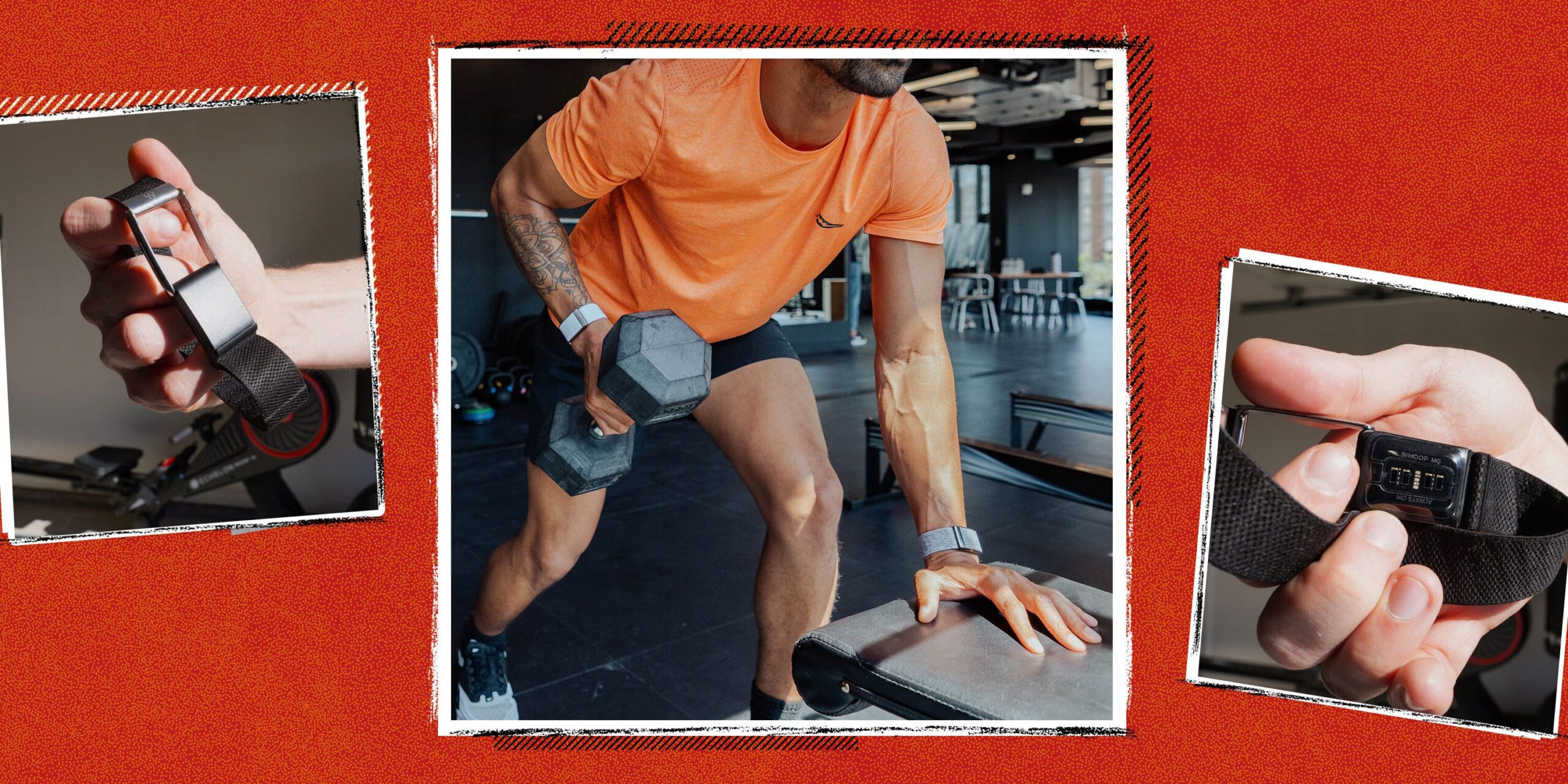
The MG hardware is understated by design. The sensor housing is smaller than previous versions, while the default fabric strap is comfortable and easy to adjust. Pairing it with my iPhone was instant, and it hasn’t lost connection in the few weeks it’s been on my wrist. In day-to-day use, it sits flush enough that it doesn’t catch on sleeves, and I didn’t have issues with it moving around during lifting sessions or short runs.
Whoop still leans into the screenless idea. Coming from the Apple Watch SE 3, the absence of a display is the biggest adjustment. You can’t quickly check the time, glance at your heart rate between sets, or see your pace mid-run. Instead, you simply go about your usual routine while the band collects data in the background. All of the feedback happens later, when you open the app and see your various scores.

Fitness and Reviews Editor Charles Thorp showing the Whoop MG’s clasp.
Battery life is where the MG stands above a typical smartwatch with 14 days of power. In my testing, I never had to charge midweek, even with multiple tracked workouts; it was more like, “I could stretch this a few more days,” without worrying about it dying on me. On the Life membership, the MG also includes a wireless battery pack that slides onto the band, so you can top up without taking the sensor off. It’s nice not having to worry about battery management.
One thing that I haven’t gotten the hang of is turning off the haptic alarm. Whoop says you can silence it by tapping the top of the device, but in my experience, it never works on the first try. Most mornings I end up repeatedly tapping it until it finally stops.
App Experience and Whoop Coach
You’ll find all your information in the Whoop app. When you open it, you’re greeted with three core metrics—Sleep, Recovery, and Strain—and you can tap any of them to see more detailed charts. For example, the Recovery section includes trends for heart rate variability (HRV), resting heart rate, respiratory rate, and more.
It can feel a bit overwhelming though. On the Apple Watch, I mostly check my three rings, but on Whoop, I’m juggling Sleep, Recovery, Strain, Healthspan, Stress, and more. Beyond Whoop’s three headline metrics, there are numerous views, charts, and toggles, plus optional features such as daily journal entries, sleep and strain notifications, and stress tracking.

The first few days with Whoop require more effort than most other trackers. It asks for more active participation to get everything set up and tailored to you, and some advanced features take time before they show meaningful results. Tools like Healthspan, which calculate your Whoop Age and your Pace of Aging, require several weeks of continuous data before they fully unlock. That means you won’t get the complete picture in the first few days of wearing the MG.
When Healthspan finally unlocked for me, it rated my Whoop Age at 3.1 years older than my actual age (as of this writing), and pegged my Pace of Aging slightly above average. That tracks with where I’m at right now: I’m a dad in my early 40s whose sleep is all over the place and less active than I used to be. If I string together a few nights of decent sleep and hit my lifting and cardio goals, I can get my Healthspan to trend in the right direction. After a week of late nights and “I’m too lazy for the gym” days, though, it does the opposite. It can be motivating, but it also adds a bit of pressure if you’re already aware you’re not in peak shape.
For comparison, Men’s Health senior fitness editor and long-time Whoop user, Brett Williams was rated younger than his chronological age, but got bumped closer to it after a few consecutive days of staying out late. Together, our experiences show how your choices can quickly show up in the data, whether you’re in great shape or trying to get back on the wagon.
The app’s home screen is fairly easy to navigate. The Recovery metric is color-coded and sits front and center, with sleep performance and strain as the other two main data points. Instead of just telling me I closed a ring, it nudges me to either back off or actually do something more than a short walk.
From there, the app features cards you can expand for more context, with a dashboard that displays your resting heart rate, steps, and calories, along with a Daily Outlook card powered by Whoop Coach. The AI-powered chatbot summarizes key metrics and gives you active recommendations for your day. As I write this, it’s suggesting I take a walk and do a short high-intensity weightlifting session. You can also ask Whoop Coach basic questions about how to improve your sleep quality, increase your daily strain, and more, and it will provide general guidance.
So far, the advice is pretty straightforward. When I asked it for habits help better recovery, it suggested I aim for a regular sleep schedule, limit screens before bed, hydrate and eat balanced meals, and try to manage stress with guided breath work—nothing that Men’s Health editors wouldn’t recommend themselves. I can see the Daily Outlook feature being helpful as I attempt to be more consistent with working out and stick to a regular sleep schedule.
Training and Strain
The nice thing about training with the MG is how quickly you forget it’s even there. The sensor is light, and the band is comfortable, and so far, I haven’t noticed any skin irritation. More importantly, the sensor can automatically detect activity based on your heart rate and movement, and in my testing it logs workouts accurately without me having to do anything.
Strength sessions and 20-minute walks around my neighborhood have appeared in the app with the right duration and relevant heart rate info. On low-key days, it’ll log a string score from just walking and chasing my kid around the house, which feels like a pretty accurate reflection of real life. Compared with the Apple Watch, which expects you to start a specific workout for tracking to be useful, the MG feels more hands-off. You do your session and then get a notification that it was logged. The app supports a wide range of activity types, including lifting, running, bouldering, and even snow shoveling. For lifting sessions, you can go in afterwards and add which exercises you did, along with sets, reps, and weight, if you want a more detailed record.

Fitness and Reviews Editor Charles Thorp rowing while wearing the Whoop MG.
Whoop’s strain metric measures the amount of exertion your body undertakes. The harder you work, and the longer your heart rate stays elevated, the higher your strain score climbs. This will then influence your recovery score the next morning. Since I’ve been taking it easy, Whoop is telling me a moderate activity could bring me closer to my optimal strain range and improve my overall fitness. I love having that kind of insight.
Subscriptions and Life-Only Features
Whoop is famously a subscription service that comes with “free” hardware, so you don’t buy the MG the way you’d buy an Apple Watch. Instead, you sign up for a membership, and the band comes with it. Keep in mind that if you were to sign up and cancel your membership a year later, the sensor will no longer collect or analyze biometric data, essentially making it useless. You can still access your past data, but you lose all ongoing trends and recommendations.

Fitness and Reviews Editor Charles Thorp showing the Whoop MG’s sensors.
Whoop recently revamped its subscription model, breaking it into three tiers based on price and features. The entry-level Whoop One costs $199 annually and gets you the standard 5.0 band with up to five days of battery life, a wired charger, and the core experience (recovery, sleep, and strain). It’s a straightforward intro to the service for people just beginning their fitness journey.
Whoop Peak, at $239 a year, adds some features on top of that. You still get the regular 5.0 hardware, but this tier promises up to 14 days of battery life and includes a wireless charger. It also unlocks Healthspan, stress tracking, and a Health Monitor view that pulls key metrics like heart rate, HRV, and respiratory rate into one place.
The top tier is Whoop Life, which goes for $359 annually and is the only way to get the MG hardware. Life gets you everything in Peak plus the Heart Screener with ECG, on-demand AFib detection, and blood pressure insights, though that last feature requires calibration with a separate cuff.
Coming from an Apple Watch, an annual subscription for a fitness tracker can feel like a big ask. Apple’s watches are a one-time purchase and already offer in-depth sleep tracking, high and low heart-rate alerts, AFib notifications, and more. If you just want basic health alerts and simple activity tracking, a traditional smartwatch will probably feel like a better deal. But if you love poring over charts and scores, and want longer battery life, the MG is easier to justify.
Whoop MG Verdict
As a daily companion, the MG is easy to live with. The band is comfortable and stays out of the way, while the extended battery eliminates any charging anxiety. Apart from the finicky haptic alarm, I’ve hardly noticed it at all, which is exactly what you want from something that lives on your wrist 24/7. Getting started in the app, though, requires some effort to truly benefit from everything it tracks. You need to actively participate and be willing to wade through the data it collects.
If you’re content closing your rings and getting the occasional alert from your Apple Watch, Whoop’s more in-depth tracking will feel like overkill. But if you’re curious about how your sleep, stress, and training all fit together, the MG gives you a clearer picture of how your body responds over weeks, not just during a workout.
Brandon Russell is a freelance writer covering gear and technology. He started his journey as a news writer at a small newspaper and later began reviewing smartphones, movies, and video games. In his free time, he enjoys the slower, more intentional experience of using a 35mm film camera and making short videos about movies he grew up watching.
Charles Thorp is the Fitness and Commerce Editor at Men’s Health, where he shares the best product recommendations in gym equipment, recovery tools, supplements, and more. Following an early life in athletics, Charles became a NASM-certified trainer and began writing programs alongside the most respected coaches in the world.
Since entering the world of fitness content, Charles has had the opportunity to learn from and train alongside high performance individuals from the NFL, UFC, NBA, Formula 1, CrossFit, US Olympics, and Navy SEALs. When he’s not writing about training programs or gear, he can be seen at the gym or in the wild, putting them to the test.
Brett Williams, NASM-CPT, PES, a senior editor at Men’s Health, is a certified trainer and former pro football player and tech reporter. You can find his work elsewhere at Mashable, Thrillist, and other outlets.
